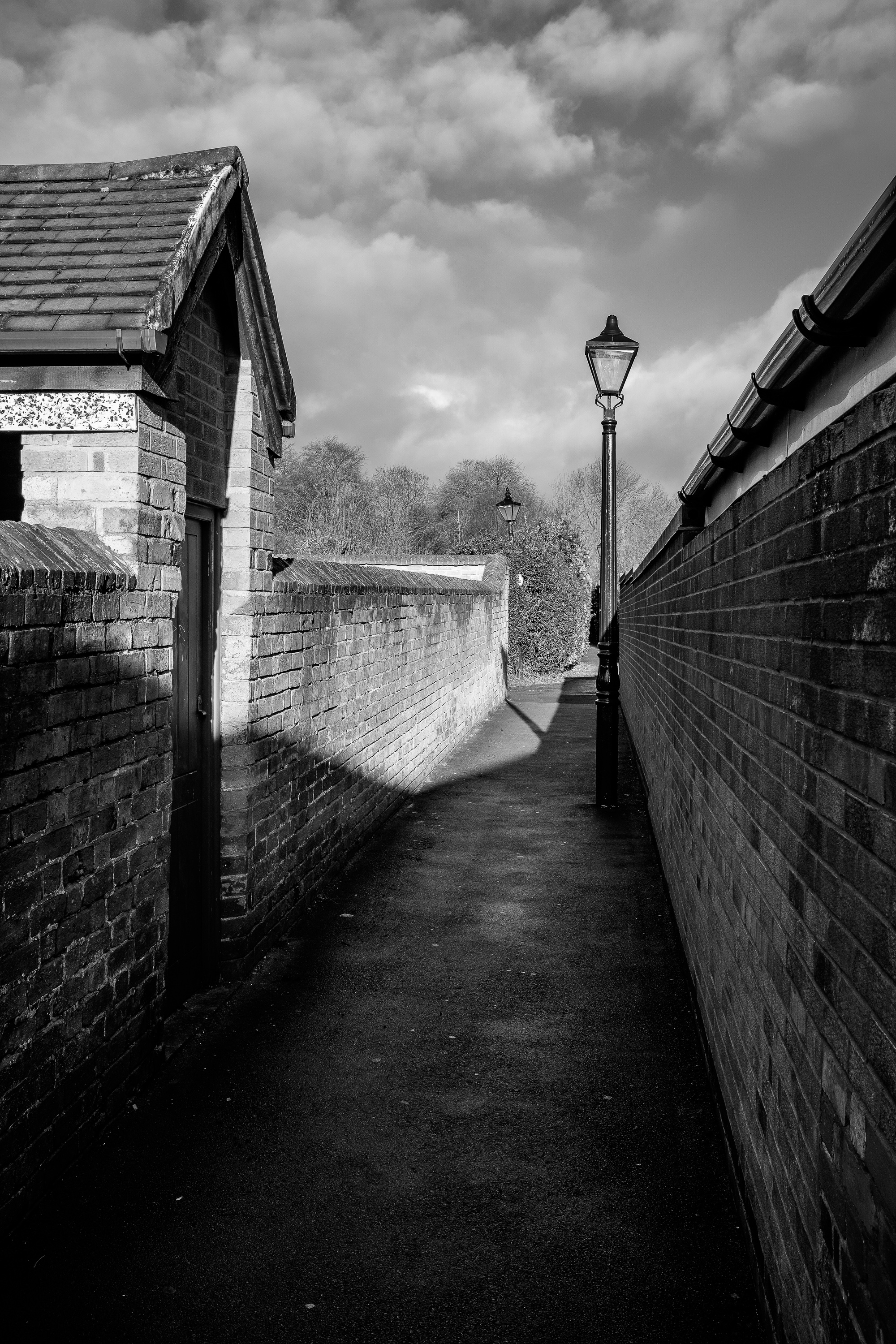
Alley next to Sainsbury’s, Wigston Magna, Leicestershire. Fujifilm X100T. The Sainsbury’s store is to the right of this shot and occupies the land which was the site of Bell Street School.
I was born and have always lived in the same house in the suburban sprawl which lies between the “village” of Wigston Magna and the city boundary of Leicester. Despite having quite a rich history Wigston is perhaps not the most photogenic of places. Sadly many of its more interesting and attractive buildings were lost to the town planners of the 1960s and 1970s. However at the heart of Wigston are still some of the lanes which people of the village have used since medieval days.
I don’t often venture out with my camera so close to home (something I will talk more about at the end of this post) but today I decided to walk the old lanes and alleys of Wigston Magna with my Fujifilm X100T. At this time of year the sun never really gets very far above the horizon here so I had some extreme lighting to contend with but I think it was worth an hour or so of my Saturday and it was good to get out in the sun at all.
Plaque set in the pathway at the centre of the medieval lanes of Wigston, the junction of Chapel Lane and Long Lane. Fujifilm X100T.
People still frequently use the lanes. Here two shoppers on their way home along the northern section of Long Lane. Fujifilm X100T – with characteristic lens flare 🙂Chapel Lane leading down from Long Street by the side of the United Reformed Church to meet Long Lane down near the allotments. I need to get back here on the next foggy night we get. Fujifilm X100T.Un-named stretch of alley between Blunt’s Lane and Moat Street. I’m tempted to christen it Chapel Lane South until I can discover otherwise. Fujifilm X100T.
It is often the case, with photography as with other disciplines, that we overlook the places closest to us. They seem less interesting, less exotic than far-flung locations. In my case my home town of Wigston is rather unlovely and yet there are still photographic opportunities if I go out and find them. But it’s not just a case of overlooking what is closest to me. As I found today and on previous occasions when I have shot so close to home I seem to feel more self-conscious and conspicuous when I’m within a short stroll of home. I don’t think it’s because I feel I might meet somebody I know, that would actually be quite a nice thing to happen. It’s not that everyone knows everybody else in a town of this size either, Wigston has a population of over 30,000 so I’m as much of a stranger to most of them as I would be anywhere else. Maybe in my case it’s because the place where I live just isn’t really all that photogenic so I feel that people will be questioning my motives for walking around the place taking photographs. As I write I do feel that this latter reason maybe hits the nail on the head. If I was in some picturesque corner of The Cotswolds then people wouldn’t even stop to wonder what I might be pointing my lens at. As it was I took my rather unobtrusive Fujifilm X100T along for this walk and that was all but I still felt like I stood out like a sore thumb. I’d be interested to hear what others think about this.
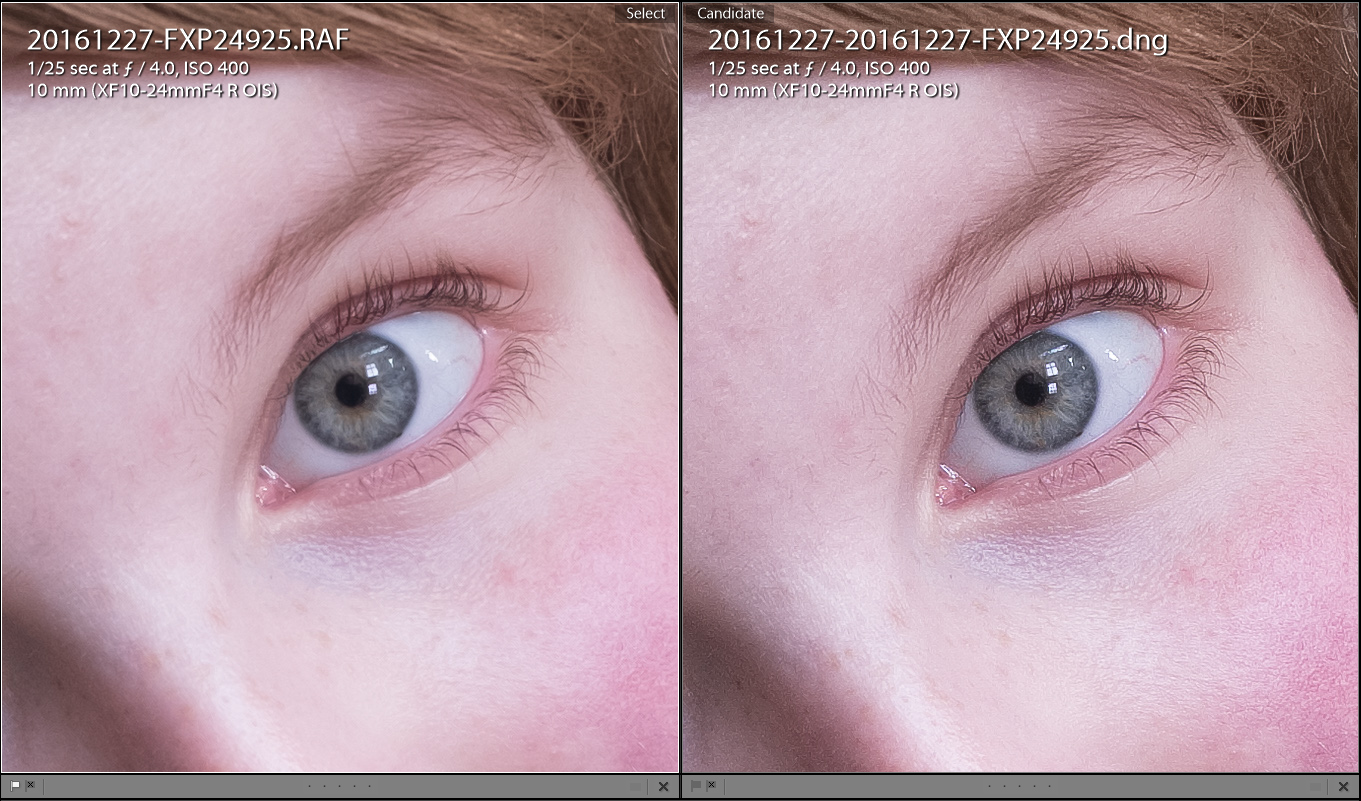
1:1 crops : default Lightroom import on the left, same file processed with Iridient X-Transformer to the right. Click to see full size (X-Pro2, Fujinon 10-24mm f4 – yes, I know – not a “portrait lens”!)
I use Adobe Lightroom as my raw processing software of choice and I have done so since it was first released. Back then I was a Canon shooter but for the last several years I’ve been shooting more and more Fuji to the point where as I write I’ve not shot using my Canon gear for over a year.
As a Fuji shooter I have been aware of the raw processing software “Iridient Developer” for quite some time. I have often been astonished by the apparent difference in the rendering of Fuji raw files between Adobe Lightroom and Iridient Developer. Iridient seemed to create cleaner, clearer, sharper renderings of the same image. This seemed all the more remarkable as Iridient Digital is a “small” company, indeed to the best of my knowledge a “one-man band”.
Impressed as I was by the results I was seeing being obtained using Iridient Developer it was sadly not for me. The software was only available for Mac OS and I switched back from Mac OS to Windows several years ago now. As a keen amateur photographer (ie – not somebody who makes a lot of money out of photography) I was not going to switch back to using Macs again just to be able to run Iridient Developer, no matter how much better it might make my results.
Last year I read rumors that Iridient were working on “something for Windows”. This was exciting news for me as I found it galling that despite much improvement over the last couple of years Lightroom still didn’t seem to render Fuji raw files as well as Iridient did.
I had been checking the Iridient Digital web site for any further news of a Windows release for several months and then just as it seemed like nothing was ever going to happen I seem to have missed the notification by about a week.
Iridient X-Transformer isn’t a full-blown raw processing package. What it does is de-mosaic the Fuji raw file and store it as a dng (Digital Negative) file. Once X-Transformer has produced the dng file you are free to import it into any raw processor you like which supports the dng format – for example Adobe Lightroom.
Over the last year or so I had been thinking that Lightroom had caught up a lot and maybe there wouldn’t be a whole lot of difference between X-Transformer results and a native Lightroom import.
I was wrong!
The comparison I posted at the head of this post shows very clearly just how much of a difference there is (click on the image to see the full size version). This is a photo I took of my daughter during a visit to Bolsover Castle on December 27th 2016. It just happened to be one of my favourite portraits of her for quite a while so it was foremost in my mind and I thought that the catch-lights in her eyes along with her eyelashes and eyebrows would give X-Transformer a good test. Lots of fine detail in the shot.
The original Lightroom import to the left looks almost like there’s something over the top of the image which makes it less distinct, although at the time I took it I was pleased enough with the photo. The eyebrows and lashes almost seem to smear together, the catch-light just isn’t crisp.
Looking at the X-Transformer processed version to the right is like putting on a pair of spectacles.
And when I say “processed” both of these images are before I’ve done any actual edits on them. The only processing has been importing into Lightroom and in the case of the X-Transformer version being converted to a dng and then importing into Lightroom. Everything is set to “default” for both versions.
The results appear to be so clear, so crisp and so sharp that I think I might need to tone down my homemade Lightroom preset for sharpening X-Trans files.
The image shown in the comparison was produced with X-Transormer before I paid to register it – an event which happened very shortly after I carried out the comparison! It cost me around £32 to purchase the software and this seems like very good value for money to reveal the true brilliant performance of all of my Fuji X-Mount lenses (and my X100T).
I intend to add X-Transformer into my Lightroom workflow by pre-processing all of my Fuji shot photos though it before importing the batch to Lightroom. X-Transformer can also be used from within Lightroom as an “external editor” (once configured according to the instructions included in the help file) – right click a photo in Lightroom and send it to X-Transformer.
It seems that X-Transformer is very aptly named. It really does transform your X-Trans photos if you’re used to the results Adobe Lightroom produces.
Edit : A bit of an oversight maybe not to show the whole of the image I used for the comparison in this post. This is after processing in Lightroom but not shown at full size.
My daughter Michelle at Bolsover Castle. Fujifilm X-Pro2, Fujinon 10-24mm f4.
Back in October I spent a couple of nights in the city of York armed only with my Fuji X100T. I really enjoyed the lack of lots of kit. Having only one camera with a fixed prime lens meant far less time faffing over which lens to use and more time spent enjoying my holiday and my photography.
I particularly wanted to walk the tour of the alleyways of York and I’ve documented the walk using Adobe Spark.